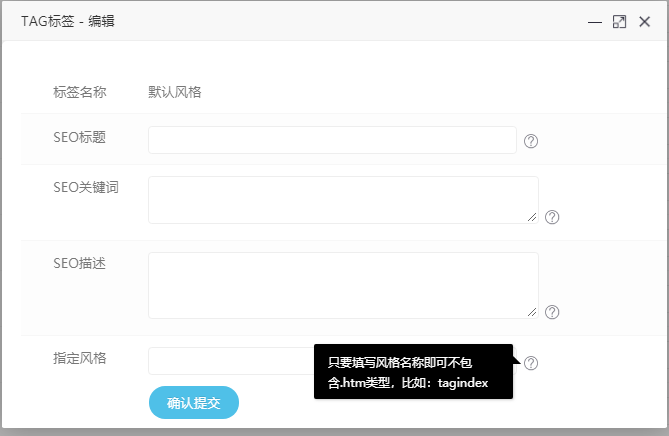
今天有人问,TAG标签能不能自定义风格,在默认程序的设置中的确没法自定义。只能通过二开,在这里小秋将用简单的方法来教大家如何实现,看效果图
1、application\home\controller\tags.php文件
找到:
1 2 3 | if (!empty($tagindexInfo)) { $tagid = $tagindexInfo['id']; $tag = $tagindexInfo['tag']; |
下面增加:
1 | $viewfile = $tagindexInfo['viewfile']; |
找到:
1 2 3 | $field_data = array( 'tag' => $tag, 'tagid' => $tagid, |
下面增加:
1 | 'viewfile' => $viewfile, |
找到:
1 2 | /*模板文件*/ $viewfile = 'lists_tags'; |
改为:
1 2 3 4 5 6 7 8 | /*模板文件*/if($viewfile) { $viewfile = $viewfile;}else{ $viewfile = 'lists_tags';} |
保存。
2、application\admin\controller\Tags.php
找到
1 2 3 4 5 6 7 8 9 10 11 | /** * 编辑 */ public function edit() { if (IS_POST) { $post = input('post.'); if (empty($post['id'])) $this->error('操作异常'); $updata = [ 'add_time' => time(), 'seo_keywords' => !empty($post['tag_seo_keywords']) ? $post['tag_seo_keywords'] : '', |
下面增加
1 | 'viewfile' => !empty($post['viewfile']) ? $post['viewfile'] : '', |
3、application\admin\template\tags\edit.htm
找到
1 2 3 4 5 6 7 8 9 10 11 12 | <dl class="row"> <dt class="tit"> <label for="tag_seo_description">SEO描述</label> </dt> <dd class="opt"> <textarea rows="5" cols="60" name="tag_seo_description" id="tag_seo_description" style="height: 60px;">{$tag.seo_description}</textarea> <p class="notic">标签调用方法:{literal}{$eyou.field.seo_description}{/literal}</p> </dd> </dl> |
下面增加
1 2 3 4 5 6 7 8 9 | <dl class="row"><dt class="tit"> <label for="viewfile">指定风格</label> </dt> <dd class="opt"> <input type="text" name="viewfile" id="viewfile" value="{$tag.viewfile}" class="input-txt"> <p class="notic">只要填写风格名称即可不包含.htm类型,比如:tagindex</p></dd></dl> |
保存。
修改文件的方法就是上面 最后 还要动数据库增加一个字段哦!如果不懂一般不建议 懂得话,就记得先备份好数据库,打开数据库管理面板 进入 管理页面 在相对应的数据库里
点击:执行 增加以下代码
ALTER TABLE ey_tagindex ADD viewfile varchar(255) NOT NULL DEFAULT '' COMMENT '模板文件';
最后重启数据库,
后台缓存即可
完成
友情说明:每次增加后要在PC目录创建一个htm文件,比如你写的风格名称是a 那么pc下面增加a.htm 文件即可!